
Agentforce can use a DataGroomr MCP server, so your Salesforce agents can look up duplicates, data quality and other DataGroomr information while they work.
Before You Start
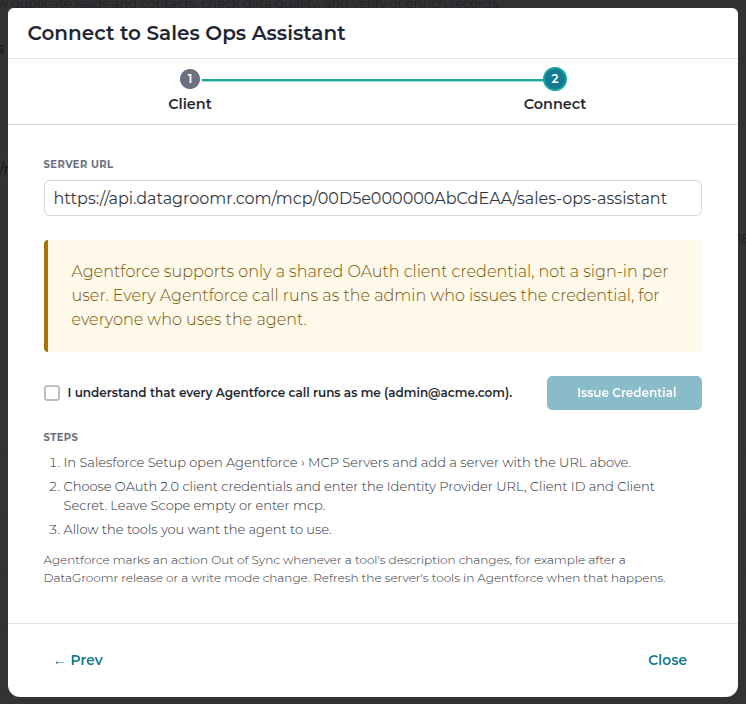
- Agentforce uses one shared credential, not a sign-in per person. Salesforce supports only a shared OAuth client credential for MCP servers, so every Agentforce call runs as the DataGroomr account admin who issues the credential, for everyone who uses the agent. Choose the server's tools with that in mind and keep the tool set narrow.
- Only an account admin can issue the credential, and each server can have one.
- The server must be in Preview first mode. Agentforce credentials are not available while a server is in Direct mode, and a server with an Agentforce credential cannot be switched to Direct.
- We recommend a dedicated server for Agentforce, starting from the Read only preset.
Step 1 - Issue the Credential in DataGroomr
- Go to Setup > API > MCP Servers, select the server and click Connect.
- Choose Agentforce.
- Tick I understand that every Agentforce call runs as me and click Issue Credential.
- Copy the Identity Provider URL, Client ID and Client Secret. The client secret is shown only once.
Step 2 - Add the Server in Salesforce
- In Salesforce Setup, open Agentforce > MCP Servers and add a server with the DataGroomr Server URL.
- Choose OAuth 2.0 client credentials and enter the Identity Provider URL, Client ID and Client Secret from Step 1. Leave Scope empty or enter
mcp. - Save. Salesforce connects to DataGroomr and lists the server's tools.
- Allow the tools you want the agent to use, and add them to your agent as actions.
Tools That Do Not Work Well in Agentforce
Agentforce cannot fill a tool input that is a list of items or a nested object, and it stops waiting for a tool after 60 seconds. Leave these tools off a server you connect to Agentforce:
- Check records for duplicates and Verify values - their input is a list of records or values.
- Create matching model, Configure Cleanse dataset, Create enrichment action, Create workflow and Create real-time trigger - their inputs are structured lists.
- Run mass action - works only without its optional advanced options.
- The AI drafting tools that come with Create rule, Create data-quality model and Create enrichment action - they can take longer than Agentforce waits.
Keep Actions in Sync
Agentforce marks an action Out of Sync whenever a tool's description changes, for example after a DataGroomr release, or when the server's write mode is changed. When that happens, refresh the server's tools in Agentforce and re-allow the tools your agent uses.
Audit and Removing Access
- Agentforce calls appear in Audit > Log Browser under the admin who issued the credential, with Agentforce shown as the credential.
- To disconnect Agentforce, open the server's Connections tab, select the Agentforce credential and click Revoke, or revoke the whole server. Agentforce calls stop immediately.
- To issue a new credential, revoke the current one first.