
In addition to the curated intelligence providers, administrators can register their own MCP (Model Context Protocol) server as an intelligence provider. Once connected, Enrichment Actions can call your proprietary or internal tools the same way they call built-in providers such as ZoomInfo, Apollo, or Claude.
Requirements
- Only remote servers reachable over HTTPS are supported, using Streamable HTTP or SSE transport.
- Local (stdio) servers are not supported, since DataGroomr is cloud-hosted.
- You need administrator access to the Intelligence Providers page.
Adding a Custom Provider
- Navigate to Setup > Cleanse > Intelligence Providers.
- Click the Add custom provider button.
- Enter a display name and the server URL.
- Choose an authentication method: OAuth 2.1 (authorization-code flow, using server-advertised metadata and dynamic client registration where the server supports it) or a static header (bearer token or API key sent with each request).
- Save. DataGroomr runs a connection test and discovers the tools the server exposes.
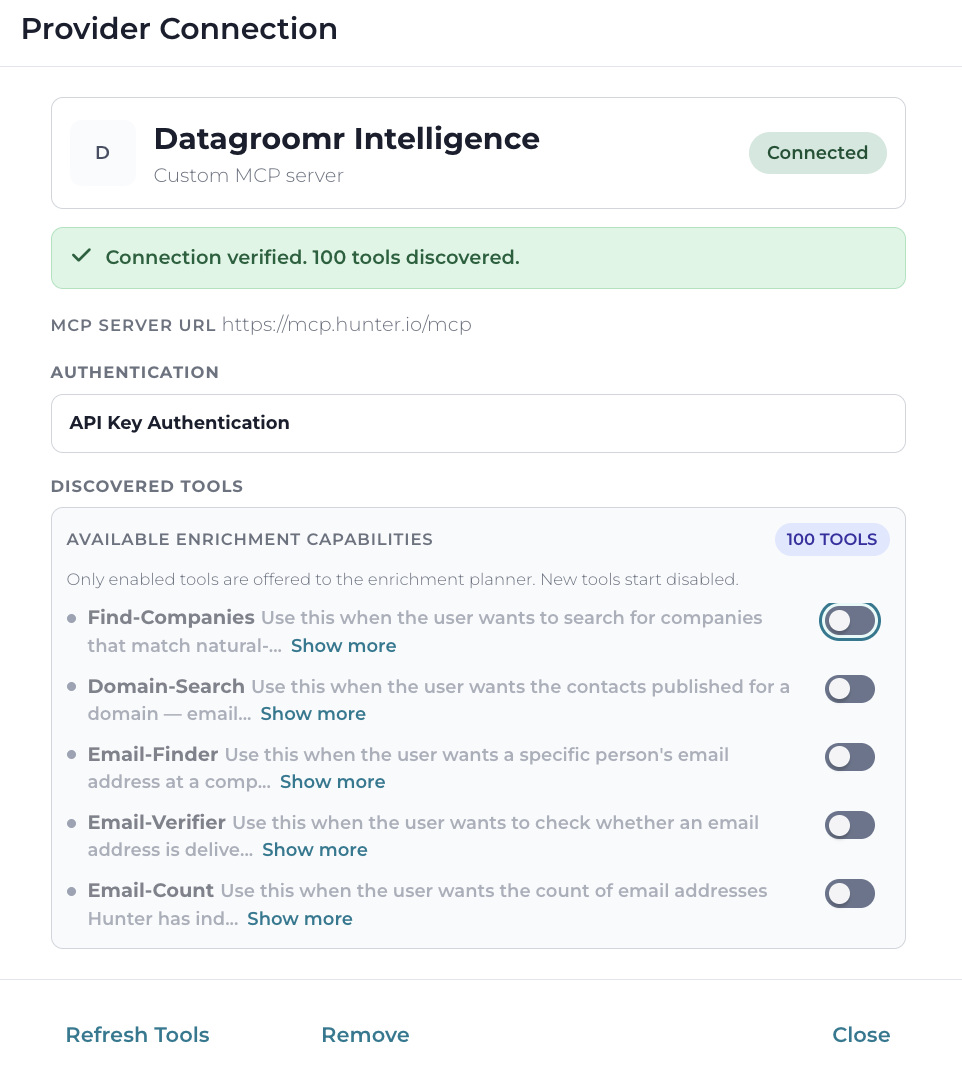
After a successful connection, the server is shown as a card using the same status vocabulary as the built-in providers (Connected, Error, or Disabled), with the same connect flow pattern.
Controlling Which Tools Are Available
The provider dialog lists each discovered tool with its name, description, and input schema. Tools can be enabled or disabled individually, and only enabled tools are exposed to Enrichment Actions. Use Refresh to re-run discovery — newly added tools appear in the list after a refresh.
Learn more: Intelligence Providers