DataGroomr provides full support during your Trial and active Subscriptions.
There are three different ways to access the support team.
- Support Widget - our support widget is conveniently available within the app. You may submit questions, attach screenshots and other information directly within the widget.

- Email - you can email your questions directly to the support team.
- Phone Support (+1 215 253 5600) - phone support is available between 8:00 AM - 7:00 PM (GMT-5). Please keep in mind that support engineers maybe engaged with other customers. If your call is not answered please leave a message with our service (or use one of the other options) and we will contact you as soon as possible.
- Create ticket - include a description of the issue, screenshots and correlation ID if available.
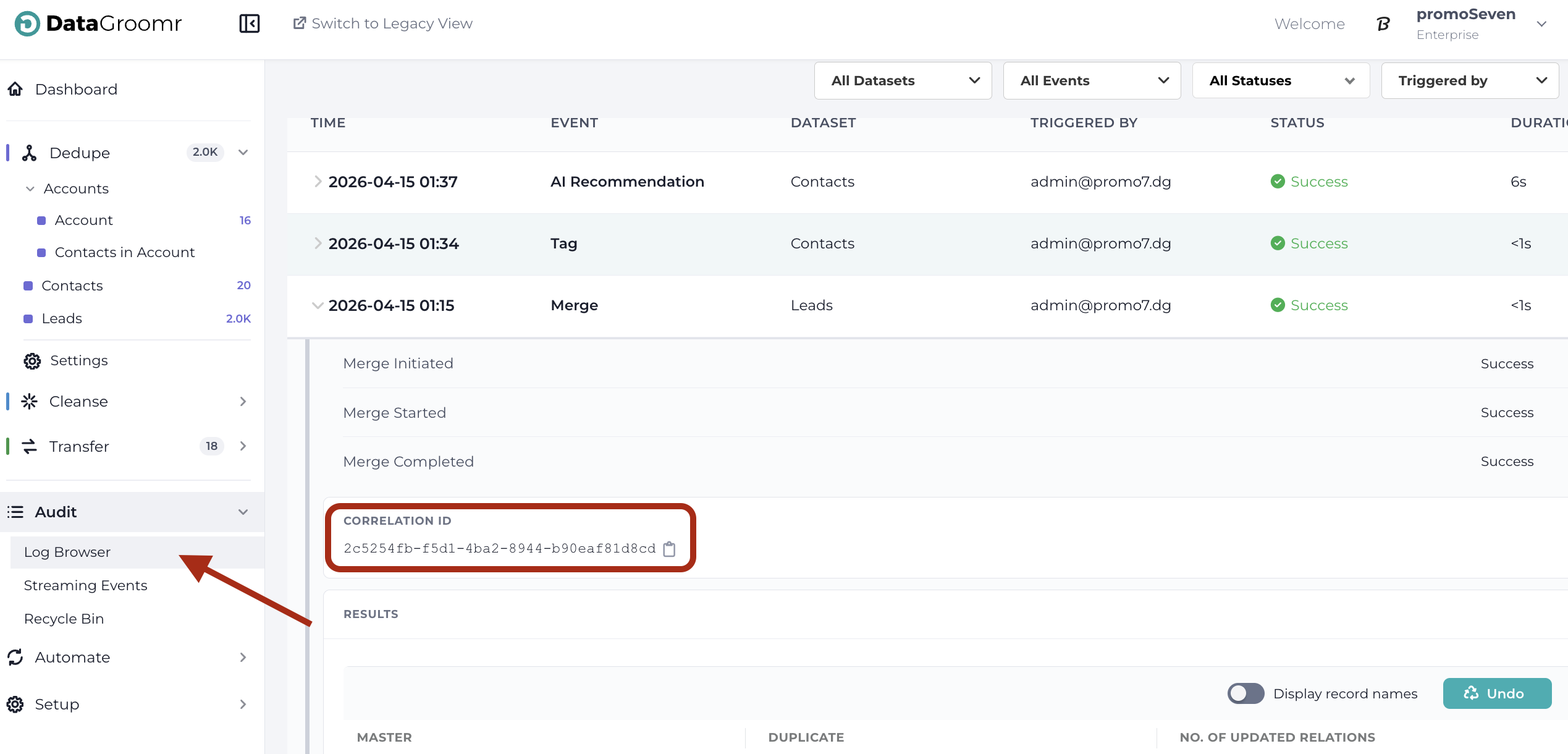
The correlation ID allows us to trace the exact operation and troubleshoot more efficiently.
You can find it by following these steps:- Navigate to Audit → Log Browser.
- Locate the event related to the error you experienced.
- Click to expand that event.
- Copy & paste the Correlation ID in the relevant field.