
Can’t merge accounts. These accounts have the same related contact. Remove the redundant account-contact relationships and then try merging again.
When Salesforce’s Contacts to Multiple Accounts feature is enabled, merges may fail with errors like above.
Salesforce requires manual cleanup of duplicate relationships. DataGroomr removes this step by automatically resolving redundant contact–account relationships so merges can complete successfully. Rollback and undo operations also preserve account-contact links and related records, ensuring data integrity even when reversing merges.
Merging Duplicate Accounts in Salesforce with Multiple Direct and Indirect Contact Relationships
Let’s take a look at this example, Initech Consulting LLC has two duplicate account records in your Salesforce organization which are related to five contacts between them. Some of the contacts are directly related to their respective accounts; others are indirectly related. As soon as you identify the duplicate accounts, you try to merge them only to encounter the error message mentioned above. So, what are your options for deduplicating these accounts?
The built-in functionality inside DataGroomr will remove the redundant relationship automatically, allowing you to proceed with the merge. All of the contacts from the duplicate record(s) will be shifted over to the master record while maintaining all of the relationships. After the merge is completed, the account will be streamlined with one company and the three correct contacts. The entire process is depicted in the diagram below.
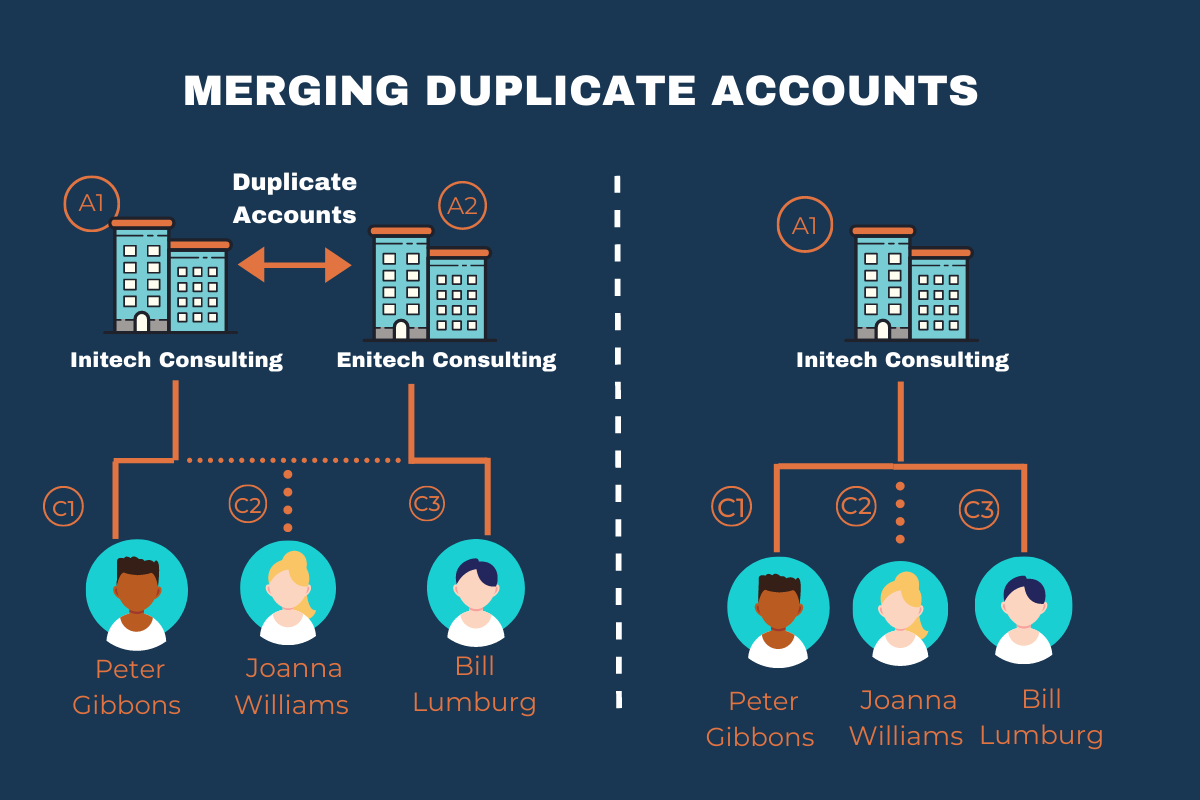
Merging Salesforce Duplicate Accounts Sharing the Same Contact
Another scenario is where there are two duplicate accounts that share a relationship with a single contact. Perhaps the only difference being is that one relationship is direct and the other one is indirect. Again Salesforce will not permit the accounts to be merged, but you can use DataGroomr to get around this restriction. DataGroomr will remove the redundant relationship and merge the accounts while maintaining only the direct relationship. This scenario is depicted in the image below.
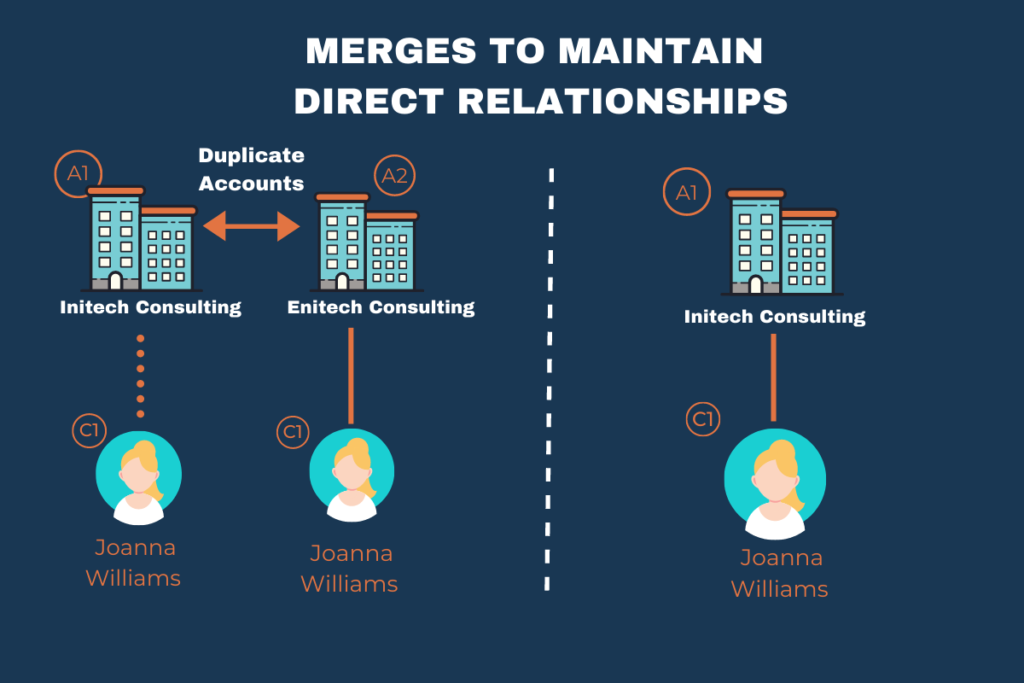
In the example above, the duplicate accounts have a direct relationship with the same contact (the result would be the same if the relationship was indirect). Only the direct relationship would be maintained after the merge.
So far, we only review merging duplicate accounts, but what about duplicate contacts? Let’s take a look at some of these examples.
Merging Salesforce Duplicate Contacts with Multiple Account Structures and Shared Indirect Accounts
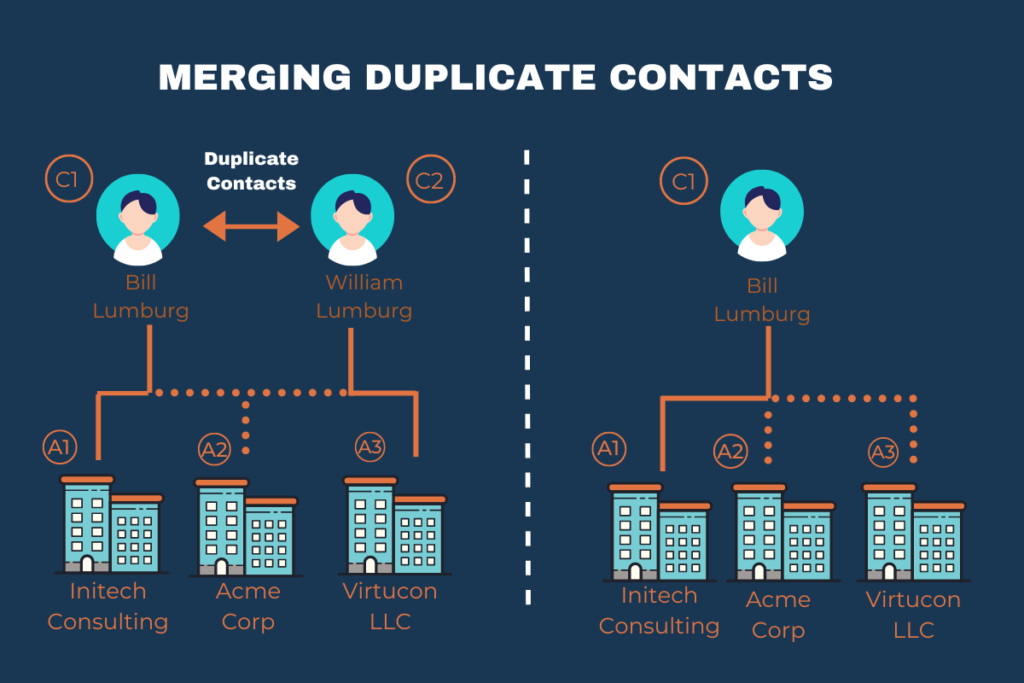
If you try to merge duplicate contacts with redundant account relationships, you will get the same error message as you did when you tried merging duplicate accounts. Salesforce will require you to manually remove the redundant relationships and then try merging again. DataGroomr removes the redundant relationship automatically allowing the merge to go through as shown in the diagram below.
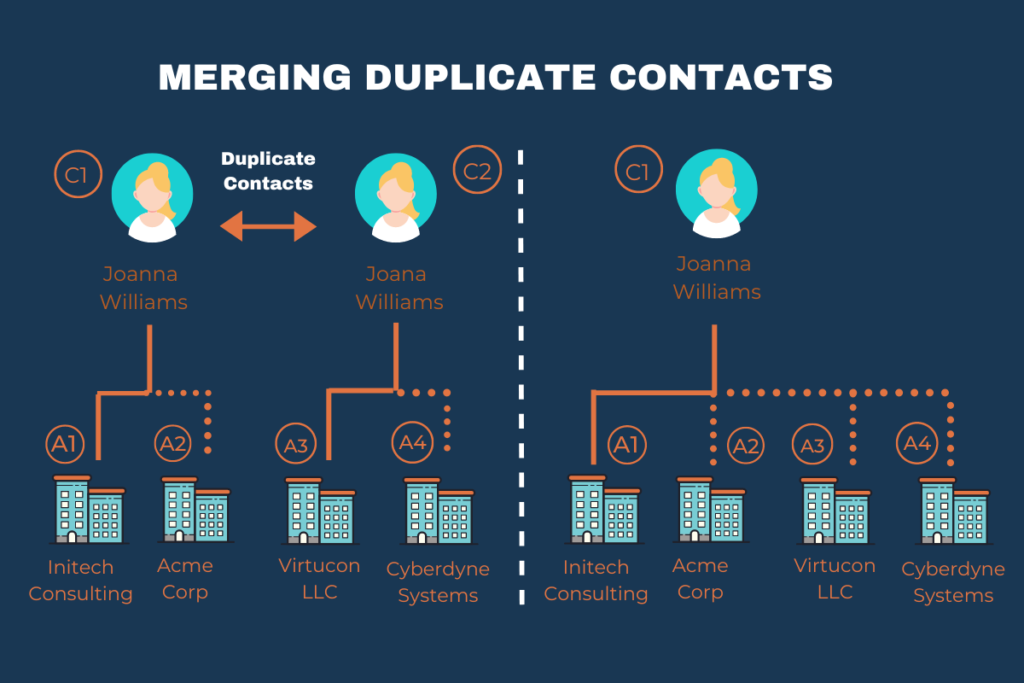
DataGroomr also makes it easier to merge duplicate contacts with multiple account structures. While it is possible to merge these contacts in Salesforce, the process is clunky and time-consuming. DataGroomr will do this automatically for you as shown in the diagram below.
How DataGroomr handles relationship Roles
Because AccountContactRelation records can carry a multi-select Roles field (e.g. Decision Maker; Influencer; Economic Buyer), merges raise a question the standard error message doesn't address: what happens to Roles when the same Contact is related to the same Account through both the master and a duplicate?
DataGroomr's behavior:
| Merge type | What we do with Roles |
| Contact merge — duplicate Contacts share an Account with the master, each side has its own Roles | Union and de-duplicate. Master Roles + duplicate Roles are combined onto the surviving relationship. Order is not preserved. |
| Contact merge — master is a "private" Contact (no Account), duplicate has a direct Account | The duplicate's direct Account is reparented onto the master, and the duplicate's Roles travel with it onto the new direct relationship. |
| Account merge | Redundant relationships are removed, but Roles on the surviving direct relationship are left as-is. Role combining only applies to Contact merges. |
Example. Master Contact has role Decision Maker on Account A. A duplicate Contact has roles Influencer; Economic Buyer on Account A. After merge, the master's relationship to Account A carries Decision Maker; Influencer; Economic Buyer.
Undo. If you later undo the merge, DataGroomr restores each relationship's original Roles value — your pre-merge state is recoverable.
For more details, see: Merging Duplicate Contacts and Accounts in Salesforce.